
Weekday email · AI brief

The Brief: AI news in plain English

Model releases, useful tools, robotics, courses, and AI jobs—sorted for people getting into AI.

Want this in your inbox every weekday instead?

Subscribe to the newsletter

Latest issue

Useful help needs an off switch

Wednesday, November 25, 20262026-11-25

Open the full issue

Nobody buys a camera hoping to become the family’s unpaid tech support. Tapo’s new touchscreen camera puts video calls on the device itself, alongside the usual home-monitoring features. That could make checking in easier, but the people in the room still need a say in when the camera watches.

Today's top stories

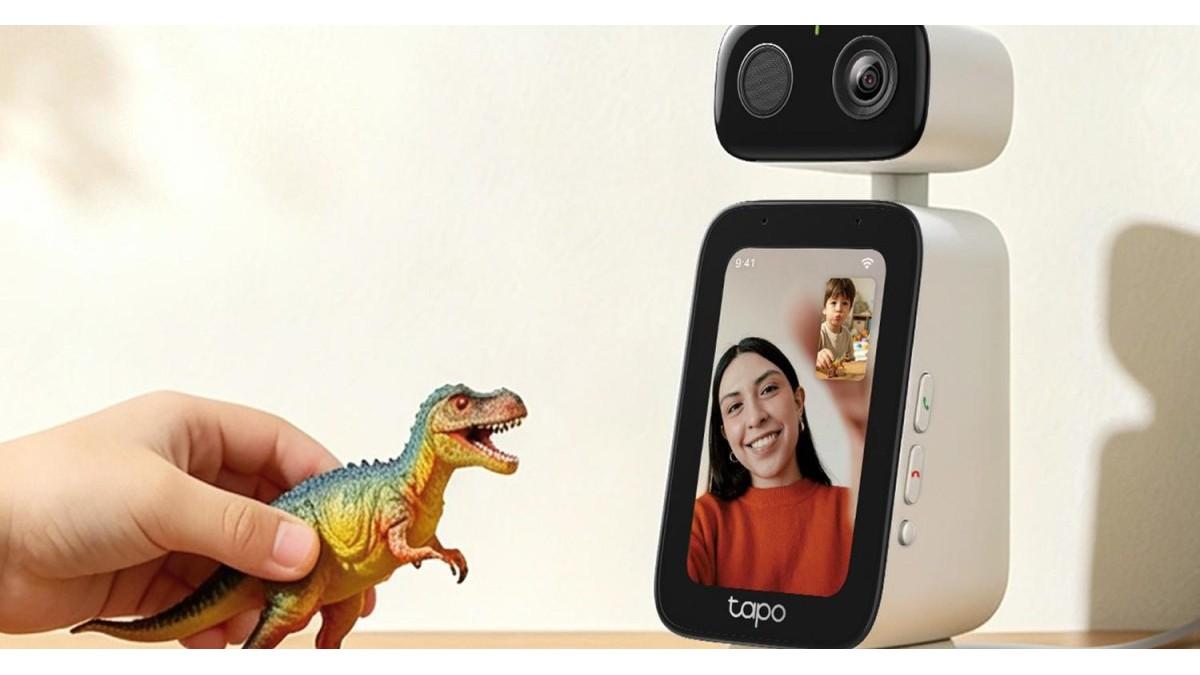
A hand holds a toy dinosaur beside a Tapo camera and display showing a video call
Tapo via The Verge
The Verge

A family check-in without another phone.

Tapo’s C825 combines an indoor security camera with a four-inch touchscreen for video calls. The U.S. store lists it at $149.99. After setup in the Tapo app, someone at home can make or answer a call with a tap instead of navigating a phone. The camera can follow movement during a call and use on-device AI to distinguish people and pets. It supports local recording to a microSD card up to 512GB without a subscription. Optional Tapo Care adds paid cloud features, so local storage does not mean every available feature is free. Only contacts invited through the app can call the camera. Privacy zones can block parts of the room, while Privacy Mode pauses streaming and recording and tilts the lens upward. Discuss those controls with everyone who shares the space before turning on monitoring.

Why it matters This could simplify check-ins with relatives who dislike phone menus. It is a launch announcement, not a hands-on recommendation or a substitute for agreed privacy boundaries.


The New York Times name in white lettering across a glass building entrance
Marcin Golba / NurPhoto via Getty Images, via The Verge
The Verge

Your client’s rules matter more than the update button.

The New York Times has told contributing photographers not to use Photoshop 2027, release 28.0.0 and subsequent updates, on Times assignments. The Verge reports that a Times spokesperson confirmed the restriction. It is a newsroom policy, not a universal instruction to stop using Photoshop. The concern is that AI features may work in ways users do not notice and leave image metadata indicating AI involvement. Metadata is information attached to a file about how it was made or edited. That label can create a problem when a client expects a tightly controlled documentary photograph. The report says the specific features behind the concern remain unclear, and Adobe had not responded when it was published. Do not turn that uncertainty into a claim that every updated photo is fabricated. Before upgrading for paid work, ask what your client permits, keep the original file and document your edits.

Why it matters A convenient edit can still break a delivery requirement. Agree on the rules before the deadline, not after exporting the final image.

Three people talk in a bright office beside large windows, one standing and two seated
Google Workspace article image, Getty Images
Google Workspace

An assistant should ask before it sends or shares.

An assistant that can read a work email is useful. One that can send it to the wrong person creates a different problem. Google’s new Workspace announcement focuses on controls for assistants working across tools such as Gmail, Drive, Docs and Calendar. Google says external assistants must obtain confirmations for consequential actions, including external emails, sharing changes and bulk edits, under the organization’s rules. Administrators can view, control and revoke agent access. These are business Workspace controls, not a promise about every personal Google account or every third-party assistant. Some protections are still coming, including more user-facing activity and revocation tools and restrictions for specific sensitive messages and files. Technical enforcement of the required Google-managed connection routes begins February 1, 2027. Ask your administrator which controls are actually available before connecting a real customer inbox.

Why it matters Useful delegation needs limits you can inspect and withdraw. Start with a low-risk task and keep human approval on anything that sends, shares or makes broad changes.

More AI signals

  • OpenAI
    AI-assisted searches of public telescope data

    OpenAI describes two amateur astronomers using Codex and Astra to search public telescope data for possible planets. Their results are candidates awaiting further assessment, not confirmed discoveries, which is a useful distinction for any AI-assisted project.

  • Universal Robots
    Universal Robots and Inbolt vision guidance

    Universal Robots says Inbolt’s vision guidance now runs directly on its Gen 7 platform, letting a robot adjust a taught movement to a part’s actual position without a separate industrial computer. Ordering is coming soon, so treat this as a vendor integration announcement rather than proof of results in every factory.

LLM releases and new features

  • Google DeepMind
    Humanity’s First Exam reliability benchmark

    Google DeepMind released Humanity’s First Exam, a benchmark with 544 elementary text and image prompts across 20 capabilities. It tests consistent answers to simple questions and variations, not just one impressive success. This is a new reliability test, not a new chatbot or a guarantee that your assistant is accurate.

Courses and learning

  • DeepLearning.AI
    ChatGPT Prompt Engineering for Developers

    DeepLearning.AI’s ChatGPT Prompt Engineering for Developers is a beginner course with a listed duration of one hour and 40 minutes. Basic Python is required. Access is free for a limited time during the platform beta, while the graded accomplishment is marked PRO. Start with the introduction, then try the Guidelines exercise using non-sensitive sample text.

Events

  • OpenAI Academy
    December 8 ChatGPT for Teachers 101

    ChatGPT for Teachers 101 runs online December 8, from 5.15 to 6.15 p.m. Eastern. OpenAI’s education team covers prompting, lesson planning, communications and checking outputs. No prior ChatGPT experience is required. Registration is offered through the K-12 Education community, with ticket price not stated.

Your move

  • The Word in AI
    Write the stop rule before the prompt.

    Pick one low-risk task you already do with an assistant. Add a clear rule that it must show the proposed result and wait before sending, sharing or changing anything. Test with made-up information, check whether the tool actually honors the rule, and use its permission settings too. A prompt is not a security control.

Brief archive